Posts

What Is a Computer Monitor Used For?

A computer monitor is an output device that is used as an electronic visual display for computers. This device allows the user to view program operations. With a mouse, the user can visually control program operations on the monitor. Cathode ray tube and liquid crystal display are the two types of computer monitors. Modern computers use liquid crystal displays. These displays are thin, light and energy efficient. Cathode ray tube monitors were popular from the beginning of the personal computer era in the 1980s until the early 2000s. These monitors are large and heavy and use more electricity than liquid crystal displays. Home

Gmail’s mobile apps will soon let you switch off Conversation view

When Gmail first launched, the default arrangement for emails was having all replies to an email bunched together with that original, making what's known as a 'threaded' group or 'conversation' – an arrangement many people weren't (and still aren't) too happy about. Although Google allowed Gmail users to disable this Conversation view on the desktop a while ago, it hasn’t been possible to do so on mobile. Until today. The ability to disable Conversation view on the Gmail app is now coming to iOS and Android handsets, allowing users to have their emails listed individually, without grouping them into threads. If Gmail is your preferred mobile email client and you’re not a fan of threading, making the switch is relatively easy: just head to the Settings menu in the app, select your Gmail account address and toggle the ‘Conversation view’ checkbox. If you can't see the option yet, hold tight – Google is rolling out the feature over the next two weeks...

WANT TO KNOW WHO IS IGNORING YOUR FRIEND REQUEST ON FACEBOOK

Have you ever received a friend request on Facebook and ignored it, thinking that the sender may not be able to find it. Then you are wrong! Did you know that Facebook allows you to find out your pending friend requests, with whom you attempted to be friends with on the social network but they chose to ignore your request instead. Here’s how you can find the people who have ignored you: Step 1: Log into your Facebook profile page on a desktop and tap the “Friend Requests” icon in the top right-hand of the home page. Step 2: On clicking the Friend Requests icon, it will load a drop-down menu populated with all of your recent friend requests that you have received, or any Friend suggestions thrown-up by Facebook. Click on “See All” at the bottom to load the complete Friend Requests page. Step 3: Then, simply click on “View Sent Requests” button at the top of the page to see who have ignored you. It will display the list of your pending requests sent (meaning: ignore...

ABUBAKAR HASSAN

Image
ABUBAKAR HASSAN Hi! My name is Abubakar Hassan I studied in one the best polytechnics in Nigeria. (Computer Engineering), As a Specialist in both computer hardware and software I also have a little knowledge on ICT support services. Also proficient in use of online journalism tools & Social media management. 

HOW TO CLEAR ANDROID CACHE DATA

Image
BY: ABUBAKAR HASSAN When you are running out of memory on your Android, clearing junk files and removing redundant data can help a lot. If you have wondered what is cached data and how to clear Android Cache data, you’ve come to the right place. We are going to discuss a number of ways by which you can easily clear cached data on your Android device. WHAT IS CACHED DATA ON ANDROID? WHY IS CACHED DATA REQUIRED IN ANDROID? Cached data are files, images and other media files stored on your devices by an app or a website. Cached data is app-specific and is stored by an app in a reserved space so that every time you load the app, it already has information ready to show you quickly. For instance, the layout of a website may be saved as cached data so that the next time you visit the page, it will load faster. CAN I DELETE THE CACHE DATA ON MY PHONE? IS IT OK TO CLEAR CACHE ON ANDROID? Cached data is automatically generated and deleting cached data does not delete any sensitive...

HOW TO DOWNLOAD TWITTER VIDEOS.

Image
HOW TO DOWNLOAD TWITTER VIDEOS. Without any doubt, Twitter is one of the most popular social media platforms and as such a great source of videos from your favorite pages, celebrities, friends, and family. In order to download Twitter videos, we can use either of the following services. TWITTER VIDEO DOWNLOADER Twitter Video Downloader is an awesome free tool for downloading Twitter videos and gifs. In order to download the Twitter videos, all you need to do is click on the Tweet, copy its URL, paste it in the input URL box and click on the “Download” button. TWDown.net One of the best and most secure free Twitter video downloader online, TWDown generates direct links for your favorite Twitter videos and enables you to save them for offline viewing and sharing. Simply copy and paste the URL of the video in the input box and hit the “Download” button. Download-Twitter-Videos This is another reliable site for downloading Twitter videos quickly. Just copy th...

SIX TIPS TO KEEP YOUR SMARTPHONE FREE FROM HACKERS

Image
BY ABUBAKAR HASSAN 6 tips to keep your smartphone free from hackers The rising hack attacks have put many smartphones at risk. In honor of National Cyber Security Awareness Month, AT&T has put together a list of tips to help keep your smartphone from being hacked. As cyber security threats continue to increase, it’s possible that your device could be affected with a virus or malware that could give hackers access to your personal or private information, AT&T said. To help keep your device secure, AT&T put together these tips: It’s important to keep your device software up to date. The latest software updates include the best available protections to help defend against these viruses. Regularly back up your data and device to avoid any information loss. Download apps only from trustworthy sources. Using alternatives to your device’s pre-loaded application store can increase the risk of downloading an application that includes a virus. To avoid having your personal,...

HOW TO BROWSE PRIVATELY USING PRIVATE BROWSING MODE

Image
BY ABUBAKAR HASSAN Almost all latest web browsers come with alone with private browsing mode that allows you to browse privately without leaving any trace. Remember, it’ll not hide you but let you browse privately by leaving no details of your browsing session like websites you visit, downloads, history and other temporary files. Private browsing helps you browse in public places where number of people access single computer. It means, when you leave the computer there is no trace of your browsing history, what you have search, sites you visit and downloads history. Web browser deletes all the history as you close the browser window. If you are using Google Chrome, Mozilla Firefox, Internet explorer or Safari then you can browse privately because all of these web browsers support private browsing mode. You just have to enable the private browsing mode and starts to browse. Follow the instructions given below for private browsing in your favourite web browser. INSTRUCTIONS FOR PRI...

HOW TO USE SINGLE KEYBOARD AND MOUSE TO CONTROL MULTIPLE COMPUTERS

Image
BY ABUBAKAR HASSAN If you are working on two or more computers and don’t want to clutter around with multiple keyboards and mice to control each PC, there’s a solution to this with which you can control all of your desktop, laptop or MAC on a single desk with a single keyboard and mouse. For this, all you need is an open source software program called Synergy. It allows you to share single keyboard and mouse with multiple PCs at your home or office workplace. You can control as many computers as you want with Synergy and it supports Windows, MAC and Linux operating systems so, if you have setup multi-OS computers, Synergy will works for you without any effort. If you have a setup of two Microsoft Windows computers then there are easy to setup alternatives: InputDirector and Mouse without Borders (Microsoft). But Synergy is better choice for cross-platform. It’s not a complicated hardware and software setup to start controlling multiple computers with single keyboard and mouse us...

TIPS TO MAKE YOUR WINDOWS 10 PC RUN FASTER

Image
Here are some “very basic” tips to keep your Windows 10 PC running smooth Experts say, Windows 7 and XP are best in terms of UI and hardware management. And the latest Windows 10 is somewhat a “bulky” OS. So if you are among the people who have updated their Windows, you may be facing issue of reduced performance(specially if you were a Windows 7 user). We are providing some stuff here, These tips should help you improve performance on your computer by cleaning the clutter you don’t really need. 1: Prevent programs from loading on startup Some programs are launched at startup, these programs are ones which Windows tries to provide fast access to . But this approach is less efficient at times when such programs are seldom used. You have to visit the Startup tab of the Task Manager (Ctrl+Shift+Esc) or use Microsoft’s official (and free) “Autoruns for Windows” tool to see what’s launching alongside the OS. From there, you can disabl...

HOW TO CHARGE YOUR SMARTPHONE FASTER

Image
This is how you can charge your smartphone faster. You put your phone on charging before you go to bed. When you check back in the morning you realize that you had not turned the switch “on”. Now you have to go on a trip and you are helpless. Is there any way to charge your phone at maximum speed so as to have sufficient battery level before leaving? Well, there are some methods which can take the charging speed to turbo mode. In some of them you have to alter some settings and in some others you have to buy some stuff. Trick 1: Put your phone into airplane mode while charging or turn it off Yes! It works. Keeping your phone on airplane mode during its charging can boost the charging by almost 27%. While turning your phone off will take it to almost 39%. Note that these percentages are results based on experiments I’ve carried out on my own Android mobile. Trick 2: Use battery saving mode: Turn on the “battery saver” while charging to aid the chargin...

HERE ARE THE BEST ANTIVIRUS PROGRAMS THAT YOU SHOULD HAVE IN YOUR SYSTEM

Image
Here are the top Anti-virus softwares for you to choose from. You can never be too careful with the level of protection present inside your computer and while Windows Defender has done a fair job in shielding your machine, there is nothing quite like having an antivirus program. According to AV-TEST, which is responsible for testing out multiple protection applications, we have been able to categorize each and every one of them depending on which area they perform the best. Let us start.  Best antivirus for Android security. There are two antivirus programs that fall into this category; Bitdefender Mobile Security and Sophos Mobile Security. Now, we’re not yet through because this award was also split into two subcategories. One was for best app overall performance, which Bitdefender Mobile Security won, while the best app protection features went to Sophos Mobile Security. Best antivirus for repairing tools Just like the first antivirus, this one was also divided into two sub-c...

WINDOWS OPERATING SYSTEM SHORTCUT KEYS

Image
Below is the list of windows O.S shortcut keys which we usually use in our day-to-day activities with a computer. Ctrl+A - Select All Ctrl+B - Bold Ctrl+C - Copy Ctrl+D - Fill Down Ctrl+F - Find Ctrl+G - Goto Ctrl+H - Replace Ctrl+I - Italic Ctrl+K - Insert Hyperlink Ctrl+N - New Workbook Ctrl+O - Open Ctrl+P - Print Ctrl+R - Fill Right Ctrl+S - Save Ctrl+U - Underline Ctrl+V - Paste Ctrl W - Close Ctrl+X - Cut Ctrl+Y - Repeat Ctrl+Z - Undo F1 - Help F2 - Edit F3 - Paste Name F4 - Repeat last action F4 - While typing a formula, switch between absolute/relative refs F5 - Goto F6 - Next Pane F7 - Spell check F8 - Extend mode F9 - Recalculate all workbooks F10 - Activate Menubar F11 - New Chart F12 - Save As Ctrl+: - Insert Current Time Ctrl+; - Insert Current Date Ctrl+" - Copy Value from Cell Above Ctrl+’ - Copy Formula from Cell Above Shift - Hold down shift for additional functions in Excel’s menu Shift+F1 - What’s This? Shift+F2 - Edit cel...

WELCOME TO THE SOURCE OF ALL INFORMATION

Image
Welcome to the Source of All Information! I would first like to introduce myself, and then provide a brief overview of my home page, so that you'll know whether what you're looking is here or not. I'm Abubakar Hassan product of Ramat Polytechnic, Maiduguri , studied Computer Engineering. If you're interested in some materials related to the course I studied follow the link below marked "Reading Materials". While I was a student at Netay Computer Institute I studied Computer Programming and web design . Reading Material Home E-mail

FINALLY 9MOBILE 60MB IS BACK ON ANONYTUN

Image
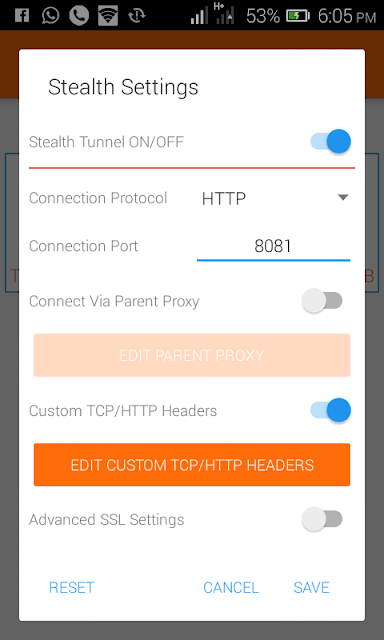
Free Browsing, Finally 9Mobile 60mb is back. A while ago it seemed like only Glo is blazing, but finally 9Mobile had given in and its time to flex for all Etisalat users. Remember that it was blocked before, when 9Mobile upgraded their network after the change of name or perhaps move from Etisalat to 9Mobile. What's new about this is the new URL/Host settings, of course still rocks perfectly on AnonyTun VPN, for me which has proven to be the VPN app so far. First, is the APN settings to use and its below; 1. Name : etisalat 2. APN : etisalat 3. APN Type: default All other things should be left as they were and now save the APN settings and activate it or choose as preferred settings for browsing. Now open the AnonyTun App, Download the App just incase you don't have it installed. Make sure you use this particular AnonyTun am suggesting which is the AnonyTun version 1.3(4) Launch the application - Click Continue Click on 1. CONFIGURATION (stealth settings) 2. Then tur...

HOW DO HACKERS HACK YOUR PASSWORDS?

Here are some ways that hackers use to hack your passwords Many of you might have been victims hackers taking over your Facebook, Gmail or other email accounts. Some of you may have lost some money to hackers after they took hacked your credit card information. Most of the information hackers get is by hacking your password. One way of keeping ahead of hackers is by knowing how do hackers hack password and what all methods and software’s they generally use. By knowing how hackers can get into your account, you will be in better situation to understand what are the possible ways you can lose your account information and passwords & you can protect yourself from getting hacked next time. How do Hackers get Passwords? There are some common technique which hackers uses to hack passwords. One of them is phishing pages, where a hacker will send a login page of Gmail or Facebook and it will look exactly the same as real Facebook login page/Gmail login page. Most of the time they use S...

HERE IS HOW YOU CAN RECOVER YOUR GMAIL ACCOUNT IF IT IS HACKED

One fine morning you discover that your all important Gmail has been hacked. There is nothing much you can do about it except try to get your account back. Main reasons for somebody hacking into your Gmail account is that you may have fallen victim to a phishing attack or your PC/laptop has been compromised with malware. Once you notice your Gmail has been hacked, try and log into the account as soon as possible. I can still log into my account – now what? If you can log in, great news! But don’t breathe a sigh of relief just yet. Remember, quick thinking will help you get your Gmail account back. Change your password immediately and make sure to check that your secondary email or security question hasn’t been changed too. Google account recovery 3 In order to do this, you want to go to myaccount.google.com and click on the Sign-in & security tab. From here, you ought to change your password and recovery options as well as enable security alerts to warn you should this happen a...

FREE LOTS OF STORAGE SPACE ON YOUR IPHONE WITH THIS EASY TRICK

This trick will free more storage in your iPhone without deleting anything. If you are an owner of an iPhone, clearing storage space is a constant concern for people with iPhones. It can be a fight to keep deleting apps and pictures to try and keep freeing up space, whether it’s to install the latest software update or to download new apps, particularly when they don’t come with expandable storage, and have limited amount of free iCloud storage, and still, understandably, produce units with only 16 GB of space. In this article, we show quick and easy tips you can use to clear the temporary files (cache)from your phone, leaving you with more storage. You can see the trick in action in this video from YouTuber iTwe4kz titled “one weird trick” garbage. Let’s go through the full process that was tested on an iPhone 6 Plus. This method works best if you have less than 1GB of storage left. The iPhone 6 Plus had only had 479 MB of internal storage available. Open Settings > Genera...

ARE YOU USING A SMARTPHONE? THIS INFORMATION IS FOR YOU AND A MUST READ

www.exclusiveguide.blogspot.com Apple has patented a process that would allow users to secretly call 911 using only their fingerprint.  In a patent published by the United States Patent and Trademark Office on Tuesday, the tech giant outlined a feature that would allow users to call emergency services "when a conventional method may not be practical.   Smartphones Although it's already possible to call 911 through the lockscreen on iOS devices, this would allow users to reach out for help when an attacker or assailant is watching, the patent said. The company suggests the technology would look for a sequence of fingerprints or applied pressure to trigger a 911 call. "The user may program the electronic device to recognize input entered with a particular sequence of fingers, such as pinky-ring-pinky, as a command to make an emergency call," the patent states. This means it might appear that a device owner is unlocking a phone for an att...

IN THE NAME OF ALLAH THE MOST GRACIOUS THE MOST MERCIFUL

IN THE NAME OF ALLAH THE MOST GRACIOUS THE MOST MERCIFUL  HELLO WORLD! YOU ARE WELCOME.